
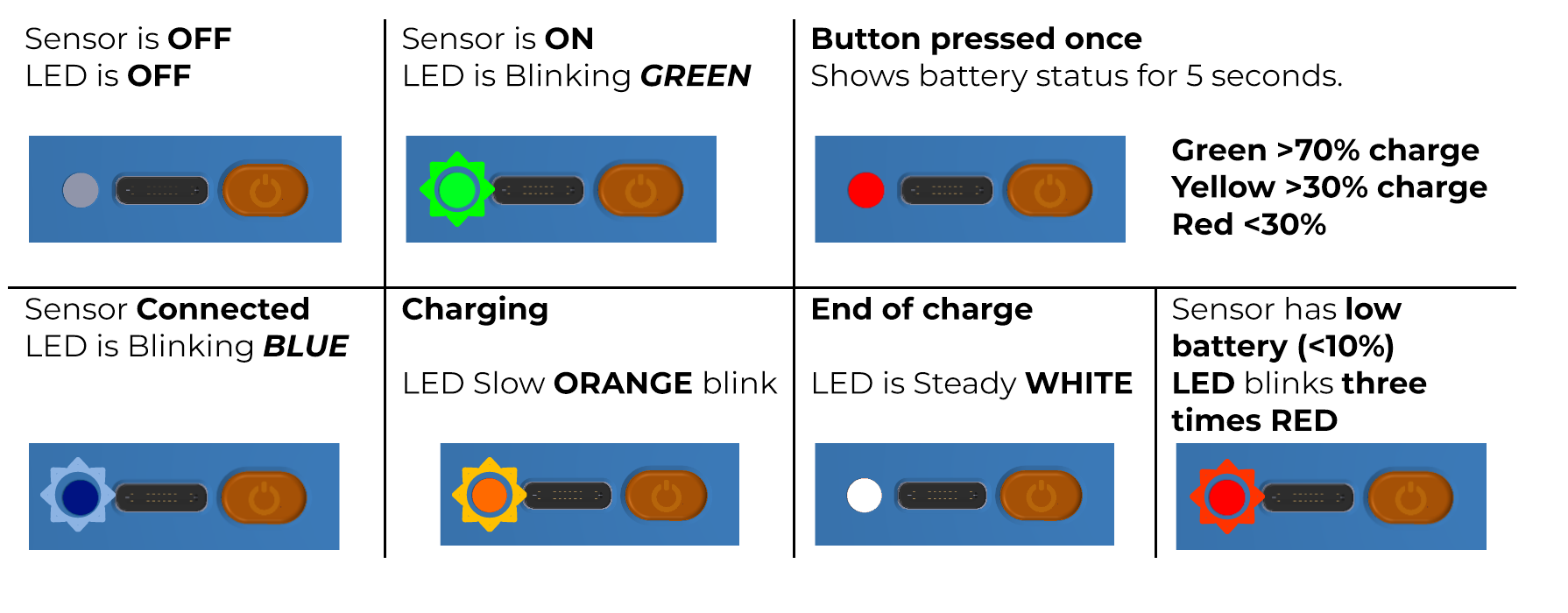
Your K-Sensor has a multicolor LED, which displays a different color depending on the battery status.
Multicolored LEDs
Simply press the button once to display the battery level with red, yellow, or green lights depending on the charge level. The white LED indicates the end of charging and that the battery is charged. The device turns off if the battery level is below 1%.
Green LED
When the device is connected via USB, the LED flashes GREEN and the device starts charging the internal battery.
The device can also be turned on by plugging in the USB cable or by pressing the orange button. The LED flashes GREEN.
Orange LED
If not connected to the application, the device will turn off after 10 minutes. The battery continues to charge, indicated by the flashing ORANGE light.
Blue LED
When the Bluetooth connection is successful, the LED flashes BLUE.
Red LED
If the battery is low, a RED light will flash three times every 5 seconds. The wireless range may be affected if the unit operates in this condition.